As I prep for my 22nd year teaching, I find myself continuing to think about design, especially in the learning management system. Below is a tour of my course and why I made some of the choices I made. My school uses Canvas but these ideas transfer well to other LMSs like Google Classroom or Schoology.
First, the page:
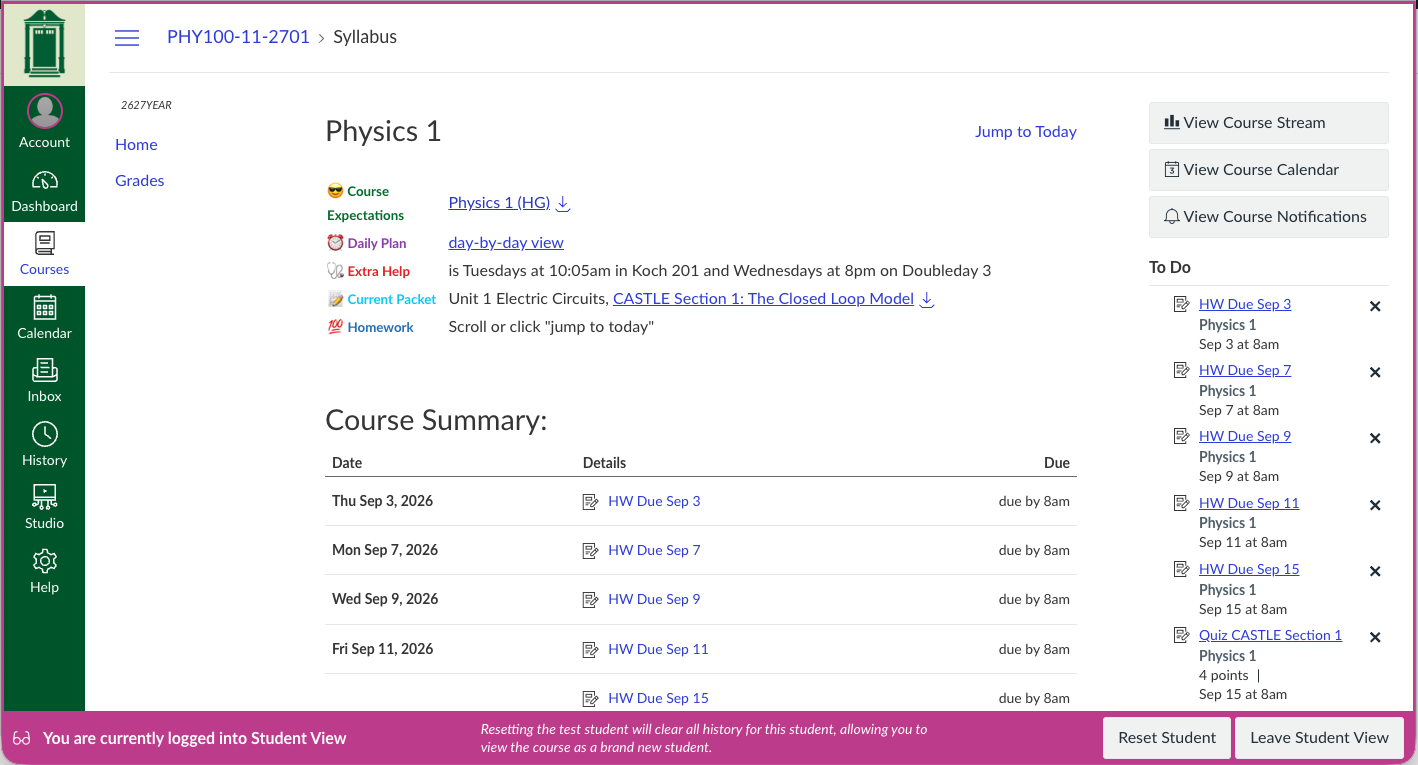
0th principle: School policy plays an important role
Starting this year, my school asked all teachers to place all graded work with deadlines on the student’s Canvas calendar. This means we will all be using Canvas Assignments. I’ve always done this but now that the calendar will be loaded with so much more information, I’m thinking about how the student will see their own schedule had me back in experience design mode.
1st principle : Place important or commonly accessed information above the fold
The day’s biggest headlines appear above the fold in a newspaper. A website’s most important links appear before you scroll. Get rid of your email address, the class location, and inspiring pictures. The first time students will see my Canvas Course, they’ll be in the classroom with me — the class location is obvious. I don’t actually want students using email (see 3rd principle) and anyhow, our email system finds the address when you start typing the name. Students can visit NASA’s Image of the Day if they need an inspirational photo. Put another way, try to minimize clicks — deep information never gets seen.
I wasn’t sure if the Daily Plan was good enough to go above the fold. I think students might want to see the lesson plan spreadsheet for what’s happening in class, or to see a descriptive view of what’s coming up. I doubt it’ll be clicked often, but had I buried it, the Daily Plan would never be clicked. Daily Plan, therefore, landed above the fold because it’s important for students to know exists.
I also imagine the list of items above the Syllabus will change throughout the year to meet student needs.
2nd principle: Reduce the number of navigational paths
Multiple paths to the same information can muddle. Figure out the navigation path you want, use Student View to confirm it looks as you want, then turn every other path off. There are some paths in Canvas, for instance that hide a feature I want to show. The second reason I turn off unused paths is to reduce clutter — too many options can distract, something I’ve always seen as a digital version of over-decorated classrooms being distracting.
TIL that reducing navigational paths likely falls under the Principle of Least Astonishment from user interface design.
From my experience, students open my Canvas course for one of two reasons: to see assignment details and look at grades, which I learned from asking students a few times each year to show me how they are finding what they need. To forefront assignments, I set the Canvas Course Home Page to Syllabus, a chronological listing of all coursework. The page is auto-generated from assignments with due dates, so I don’t have to update it separately. I used the Settings > Navigation screen to turn off all the Nav links I don’t want students using (but especially for me, that’s Files, Modules, and Assignments — YMMV).
3rd principle: Stay in Canvas and out of email
Switching out of Canvas to email a question to your teacher is an opportunity for student distraction. I want to keep the eyeballs and brains in Canvas, so I’m using the Assignment Submission Comments. This is a new approach for me.
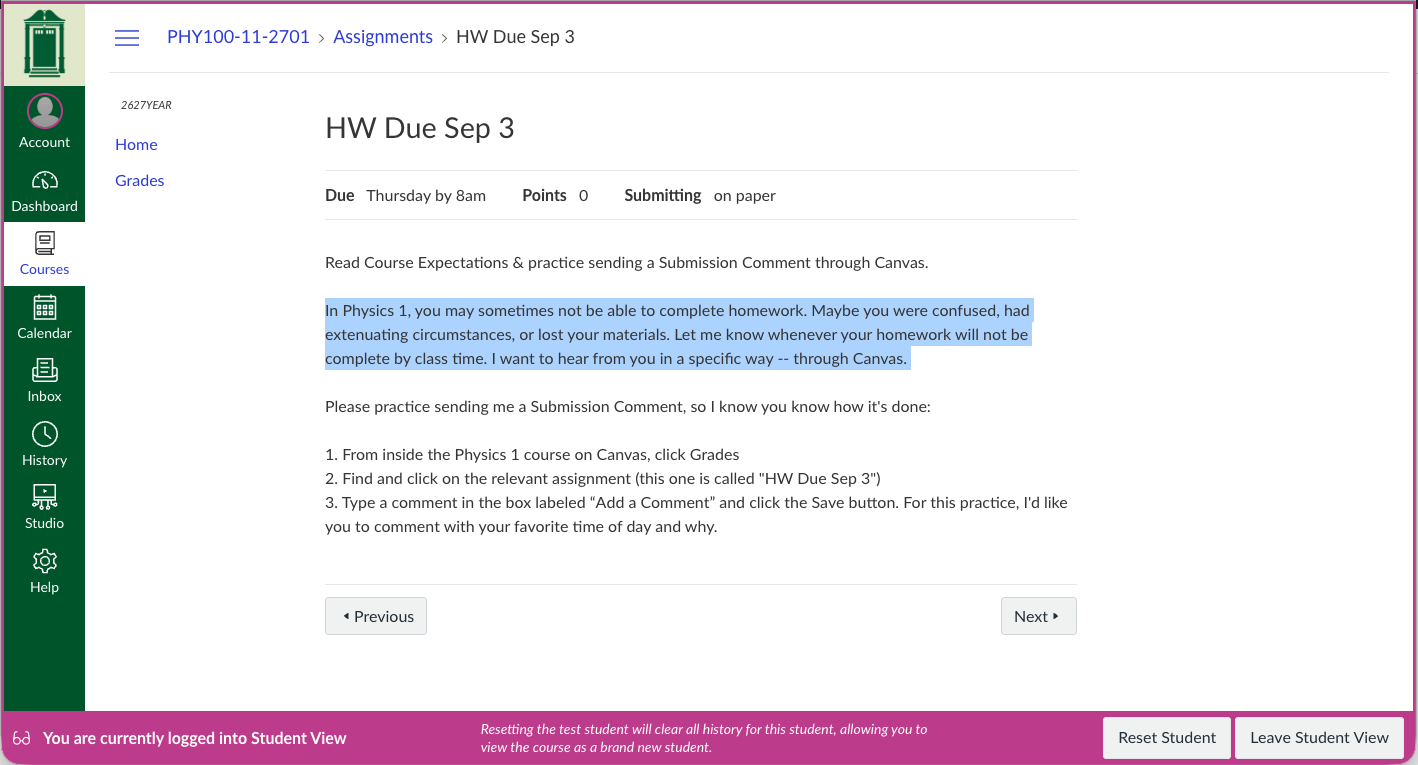
The primary use case is a student who cannot complete their homework. Happens a lot in Physics 1 and I can’t keep up with the many ways I hear from them. So, if a student wants credit for trying the homework but cannot finish it, then they must reach out through an Assignment Submission Comment. We’re practicing this mechanism right away:
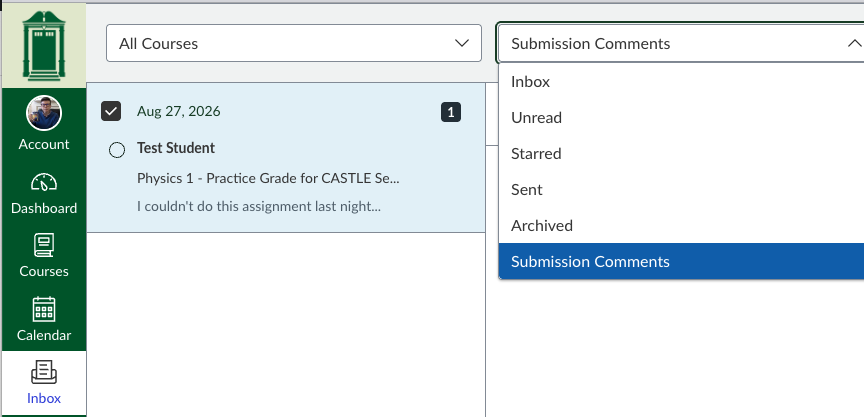
Teachers can see Submission Comments on a single assignment by clicking Inbox > Submission Comments as shown:
Your turn
- How are you thinking about your course setup in a Learning Management System?
- What principles guided those choices?
- Would you be willing to share a screenshot of your course home?
- What’s giving you trouble in the LMS?

